
Ed Growth is moving over to a more secure login process. We will be using our rpsk12.org accounts (Google) to access this site. For now, both options are available, but please take this time to test your rpsk12.org account to make sure everything is working. If you encountered any issues, please email ranastas@reverek12.org and report what you are experiencing.

Educator Growth account

Use your existing username and password.

Available until 10/8/26

Please test your rpsk12.org credentials --->

rpsk12.org Google account

Sign in with your school-issued Google account.

Sign in with Google

Forgot Ed Growth Password Email Support

First time signing in with Google?

Step 1. Choose your @rpsk12.org account. You will see your own name, not this example.
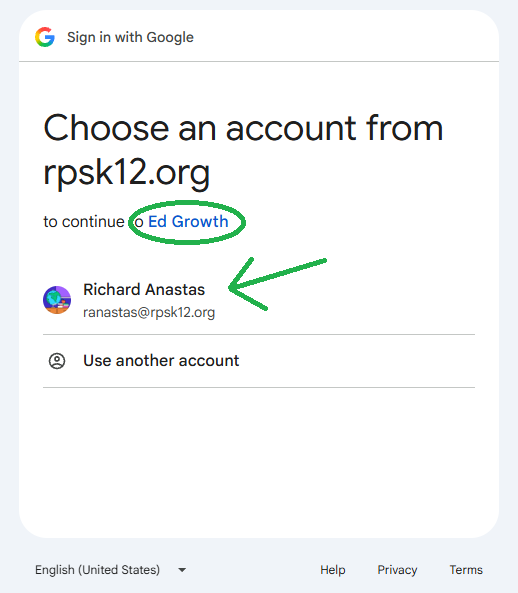
Google account picker showing an example rpsk12.org account

Step 2. Click Continue to allow Ed Growth to confirm your name and email.
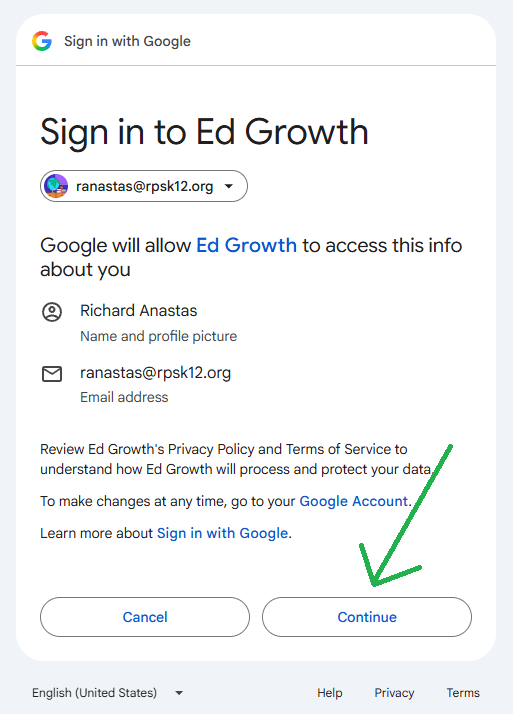
Google permission screen with Continue highlighted